Sionna RT digital twin
The boundary is deliberately simple:
OAI transmitter → external Sionna RT channel → OAI receiver
oai-python does not depend on Sionna and does not implement a channel model.
The example alone installs sionna-rt, loads Sionna's built-in Munich scene
around the Frauenkirche, traces one gNB/UE pair, converts the paths to SISO
taps, applies them to copied time-domain IQ samples, and returns those samples
to the OAI receiver.
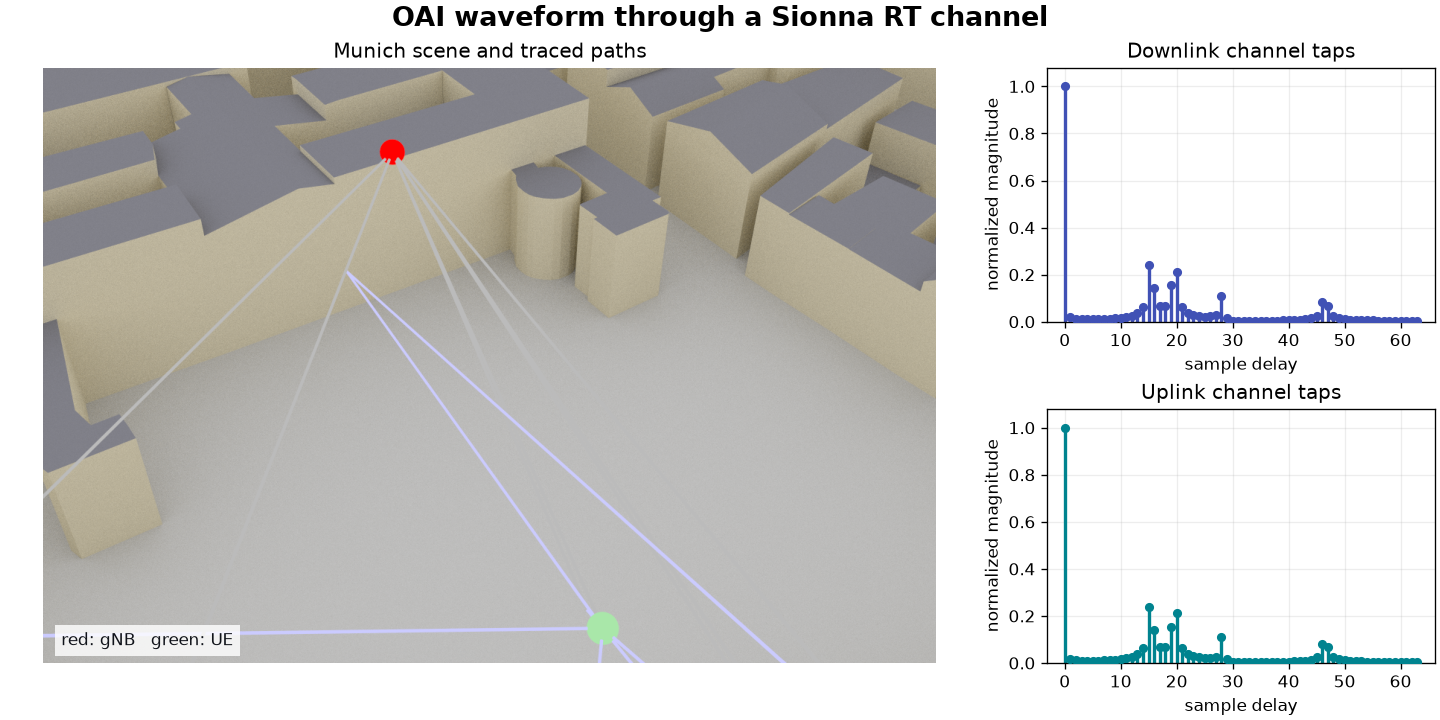
The image is generated by the example itself: red is the gNB at
[8.5, 21.0, 27.0] metres, green is the UE at [45.0, 90.0, 1.5] metres,
and the two plots are the exact normalized taps applied to the OAI IQ samples.
Run it
From a repository checkout with an installed oai-python wheel:
uv run --no-project --python 3.13 \
  --with 'sionna-rt==2.0.1' --with 'matplotlib>=3.8' \
  --with oai-python docs/examples/sionna_rt_channel.py \
  --plot sionna-munich-link.png
Expected output:
Sionna RT digital twin: downlink and uplink decoded
downlink transport block: b'\x00\x01\x02...'
uplink transport block: 384 bytes
visualization: /.../sionna-munich-link.png
The scene and channel are completely user-owned. Replace Munich with another built-in or Mitsuba XML scene, change the antenna positions, path-solver options, tap conversion, or the channel callable without changing the bindings. The explicit regular CPython selection is intentional: Sionna RT's Mitsuba dependency does not currently provide a free-threaded CPython wheel.
The application boundary
with NrPhyLink(
    downlink_channel=SionnaRtIqChannel(downlink_taps),
    uplink_channel=SionnaRtIqChannel(uplink_taps),
) as link:
    downlink = link.step(downlink_payload=payload)
The complete checked script is
sionna_rt_channel.py.
Sionna RT is not installed by oai-python and is not a package extra. It is not
imported by any ordinary binding path.